

Why Algorithms and Flowcharts Matter
“An algorithm must be seen to be believed.” – Donald Knuth. That line captures the essence of computing. Algorithms aren’t just abstract ideas; they’re the step-by-step guides that power every program you’ve ever used.
Think about this: over 90% of modern software relies on structured algorithms to automate decisions and solve problems efficiently. Without them, even the simplest app would fail. That’s why every IT student and programmer needs to master how to design, read, and translate algorithms into flowcharts.
In this lesson, you’ll learn the foundation of algorithms in programming and see how flowcharts provide a clear visual representation of processes. We’ll walk through core characteristics, flowchart symbols, and practical examples — from verifying age input to designing a login system.
By the end, you won’t just know what an algorithm flowchart is. You’ll know how to create one that makes problem-solving faster, clearer, and easier to implement in code. Let’s get started!
What is an Algorithm?
At its core, an algorithm is a set of well-defined instructions for solving a problem or completing a task. It’s not guesswork. It’s a clear, repeatable process that anyone—or any computer—can follow step by step.
In programming, algorithms act as the backbone of every application. They tell the computer what to do and when to do it. Without algorithms, writing code would be like giving directions without knowing the destination. Precise steps make execution possible.
The power of algorithms lies in their role in problem-solving. A well-crafted algorithm ensures that a task is completed not only accurately, but also efficiently. From automating simple calculations to running search engines, algorithms are everywhere.
As you explore this lesson, keep in mind that an algorithm isn’t just a theoretical idea. It’s the practical foundation for every flowchart, every decision tree, and every piece of working code you’ll ever write.
Role in Problem-Solving and Programming
Algorithms and flowcharts play a critical role in breaking down complex problems into manageable steps. They transform vague ideas into structured solutions. Instead of jumping straight into code, you first build the logic — and that makes your program more reliable.
- Automation: Algorithms automate tasks by providing instructions that computers can execute without constant human guidance.
- Efficiency: Well-designed algorithms reduce wasted time and resources, ensuring that tasks are done in the shortest possible way.
- Accuracy: A clear algorithm removes ambiguity. Each time it runs, you get consistent and predictable results.
In programming, this means fewer errors, cleaner code, and systems that scale better. When paired with a flowchart, the steps become visual, making it easier to spot mistakes or gaps in the process before a single line of code is written.
Whether you’re building a login system, designing an exam grading tool, or creating a business workflow, algorithms and flowcharts give you a framework to solve problems logically and systematically.
Characteristics of Algorithms
Not every set of steps qualifies as an algorithm. To be effective, an algorithm in programming must meet a few essential characteristics. These qualities make the difference between a vague idea and a structured, executable solution.
- Finiteness: An algorithm must always finish after a limited number of steps. Endless loops without conditions are not valid algorithms.
- Definiteness: Every step must be precise and unambiguous. Clear instructions leave no room for misinterpretation.
- Input: An algorithm must accept input. For example, finding the largest number requires a list as input.
- Output: Every algorithm must produce at least one result directly related to its input.
- Effectiveness: The steps should be simple enough to carry out with basic tools like paper and pencil. If it requires advanced technology just to work, it isn’t effective.
These characteristics ensure that algorithms are practical, testable, and easy to translate into flowcharts and code. Without them, your logic risks becoming incomplete or unworkable in real applications.
Algorithmic Notation: Flowcharts
An algorithm flowchart is a visual tool that represents the steps of an algorithm in a structured way. Instead of reading lines of text, you can see the logic unfold through shapes and arrows that map the flow of the process.
A flowchart simplifies complex ideas. It shows the start, decisions, actions, and outcomes — all in a format that’s easy to follow. That’s why flowcharts are widely used in programming, business processes, and engineering.
More than just diagrams, flowcharts are problem-solving tools. They help you:
- Document how an algorithm works step by step.
- Communicate logic clearly to team members or non-programmers.
- Spot bottlenecks or errors before writing code.
- Improve existing workflows by analysing the decision points.
By mastering flowchart symbols and their correct use, you can turn abstract algorithms into clear, actionable workflows. This is the bridge between planning and coding.
Symbols in Flowcharts
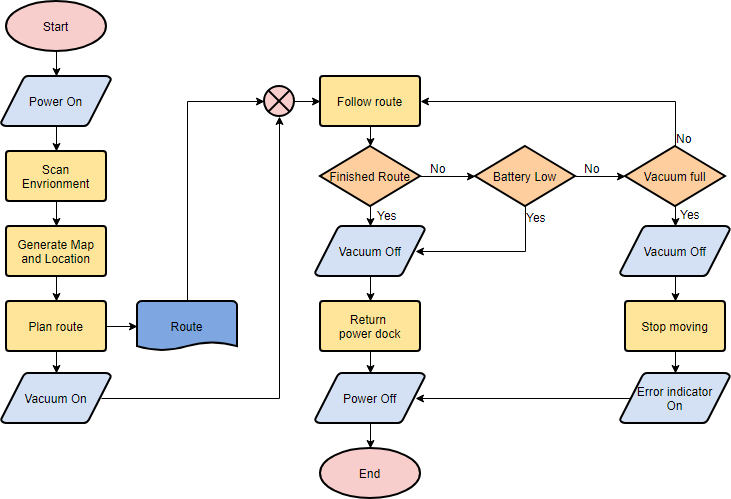
To make a flowchart effective, you need to use the correct symbols. Each symbol has a specific meaning, and together they make the algorithm flowchart easy to read and understand.
- Oval: Represents the start and end of a flowchart. These are the entry and exit points of the process.
- Rectangle (Process Box): Denotes a process step or operation, such as a calculation or data handling task.
- Diamond (Decision Box): Represents a decision point that involves a yes/no or true/false condition. The path splits based on the answer.
- Parallelogram (Input/Output): Indicates data input (like reading user input) or output (such as displaying results).
- Arrow (Flow Line): Shows the direction of flow between steps, connecting all symbols in sequence.
Using these flowchart symbols correctly ensures that your algorithm is not only structured but also universally understood. Anyone familiar with flowcharts should be able to follow your logic without extra explanation.
Designing a Flowchart
Designing a flowchart means breaking down an algorithm into clear, ordered steps, then using the correct symbols to represent each action. A good flowchart makes your logic visible and easy to follow.
Here’s a practical way to approach flowchart design:
- Identify the Tasks: List all the tasks involved in the algorithm or process. Be sure you understand their sequence and relationships.
- Organize Sequentially: Arrange the tasks in the order they should be executed.
- Select Symbols: Use rectangles for actions, diamonds for decisions, and parallelograms for input/output steps.
- Draw Arrows: Connect the symbols with arrows that guide the flow from start to finish.
- Review and Refine: Check the flowchart for clarity, accuracy, and completeness. Make sure every possible scenario is covered.
Following these steps ensures your algorithm flowchart is easy to interpret and free of unnecessary complexity. This preparation saves time once you move on to coding.
Flowchart Examples
To make the concepts concrete, let’s look at some flowchart examples that solve everyday programming problems. Each example starts with a simple algorithm and is then represented as a flowchart.
Example 1: User Age Verification
Scenario: A system needs to verify if a user is 18 years or older.
- Start
- Input Age (Parallelogram)
- Decision: Is Age ≥ 18? (Diamond)
- If Yes → Output “You are an adult.”
- If No → Output “You are not an adult.”
- End
Example 2: Grade Classification
Scenario: Classify a student’s grade based on their score.
- Start
- Input Score (Parallelogram)
- Decision: Is Score ≥ 90? → Grade A
- If No → Is Score ≥ 80? → Grade B
- If No → Is Score ≥ 70? → Grade C
- If No → Is Score ≥ 60? → Grade D
- If No → Grade F
- End
Example 3: Simple Login Verification
Scenario: Verify login credentials and grant or deny access.
- Start
- Input Username and Password (Parallelogram)
- Decision: Are credentials correct?
- If Yes → Output “Access Granted”
- If No → Output “Access Denied”
- End
Example: Loop in a Flowchart
Loops are a fundamental part of algorithms. They allow you to repeat tasks until a condition is met. Let’s look at a simple algorithm flowchart example that prints “Hello World” five times.
Algorithm Steps:
- Initialize
count = 0(Process) - Print “Hello World” (Input/Output)
- Increment
countby 1 (Process) - Decision: Is
count < 5? - If Yes → Go back to Step 2
- If No → Stop
This flowchart example demonstrates how repetition works in problem-solving with algorithms. Instead of writing five separate print steps, the loop automates the process efficiently.
Example: Gmail Login Flowchart
Login systems are everywhere — from social media to email. Let’s break down the algorithm flowchart for logging into a Gmail account. This example highlights the combination of inputs, processes, and decision points in a real-world application.
Algorithm Steps:
- Enter
gmail.comin your browser (Input/Output) - Gmail main page loads (Process)
- Enter your Email Address and Password (Input/Output)
- Decision: Are Email Address and Password valid?
- If No → Show login error (Process), then go back to Step 3
- If Yes → Display Gmail account (Input/Output)
- End
This flowchart example demonstrates how authentication works at a high level. By mapping it out, you can easily spot the decision point (credential check) and see how errors loop back to user input.
Wrapping Up: Algorithms and Flowcharts
Algorithms give us the logic. Flowcharts make that logic visual. Together, they form the foundation of problem-solving in programming. From simple tasks like printing a message multiple times to real-world systems like login verification, the algorithm flowchart remains one of the most powerful tools you can use to design efficient solutions.
As you continue to practice, focus on clarity. The easier your flowchart is to follow, the easier it will be to translate into working code. That’s where the real value lies.
Mandatory Assessment
All students must complete the assessment for this lesson. Your submission is required for course completion.
Take the Algorithm & Flowchart AssessmentDon’t miss this! Completing the assessment is required.
Expand Your Knowledge
Use these resources to reinforce your understanding of algorithms and flowcharts:
Expand Your Knowledge
Dive deeper into technology and productivity with these related articles:
- Understanding IT – Build a solid foundation in Information Technology essentials.
- Specialist vs Generalist – 85% of companies now seek hybrid talent. Discover whether to specialize or generalize in your career, with actionable strategies to become a T-shaped professional and future-proof your skills.
- Prompt Engineering: Writing Effective AI Prompts – Master the skill of crafting precise AI prompts for better results.
- Understanding Brain Rot in the Digital Age – Break free from digital overload and regain focus.
- Effective Study Techniques for Better Learning – Discover research-backed strategies to boost learning retention.
No comments yet. Be the first to share your thoughts!